
Review
Moo0 VoiceRecorder for Windows: A Comprehensive Overview
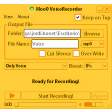
Moo0 VoiceRecorder is a versatile and user-friendly voice recording software available exclusively for Windows users. This productivity tool has been a go-to solution for numerous individuals and businesses due to its simplicity and effectiveness in capturing and managing audio files.
What Does Moo0 VoiceRecorder Do?
Moo0 VoiceRecorder is designed to record voice memos, lectures, meetings, or any other audio content with ease. It allows users to easily capture and save audio files directly from their Windows devices, making it an indispensable tool for note-taking, educational purposes, or professional use.
Key Features of Moo0 VoiceRecorder
- Real-time Recording: Capture audio in real-time without any interruptions.
- Multi-Format Support: Save recordings in various formats, including MP3, WAV, and OGG.
- Organized Storage: Organize and manage your audio files with ease, thanks to the user-friendly interface.
- Editing Capabilities: Trim, split, and merge recordings to refine your audio content.
- Portability: Export recordings for easy sharing or archiving.
Use Cases for Moo0 VoiceRecorder
Moo0 VoiceRecorder can be utilized in a variety of scenarios:
- Educational Settings: Record lectures, seminars, or discussions for later review.
- Business Meetings: Capture meeting minutes and discussions for reference.
- Note-Taking: Record important information during conferences or training sessions.
- Voice Memo Management: Organize personal or work-related voice memos efficiently.
Pros and Cons
Pros: Moo0 VoiceRecorder excels in its simplicity and reliability, offering a seamless experience for users. The absence of unnecessary features ensures a clean and intuitive interface.
Cons: While the software is free and lightweight, it may lack advanced features compared to more specialized recording tools. However, for basic and frequent voice recording needs, it is an excellent choice.
Who is Moo0 VoiceRecorder for?
Moo0 VoiceRecorder is ideal for:
- Students and educators in need of recording lectures or educational materials.
- Business professionals who require accurate and easy-to-manage meeting notes.
- Individuals who frequently take voice memos for personal or work-related purposes.
Tips for Using Moo0 VoiceRecorder
- Set Up Microphone Settings: Ensure your microphone is correctly configured to achieve the best recording quality.
- Organize Your Files: Use the built-in organizational tools to keep your recordings well-structured and easy to find.
- Export Regularly: Periodically export your recordings to ensure you have a backup and can easily share or access them later.
Overall, Moo0 VoiceRecorder is a reliable and efficient tool for voice recording on Windows. Its simplicity and effectiveness make it a top choice for a wide range of users, from students to professionals. If you’re in need of a straightforward voice recording solution, Moo0 VoiceRecorder is definitely worth considering.
Ratings
18 reviews



