
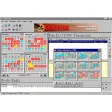
Task Plus for Windows
by More programs (4)
Review
Task Plus for Windows: A Comprehensive Productivity Tool
Task Plus for Windows is a popular personal task management utility that has been a staple in the productivity software category since its inception in 2005. Designed for Windows users, this software has garnered a significant following, with over 20,460 downloads since its release.
What Task Plus Does
Task Plus for Windows is a powerful tool that helps you manage your daily tasks and appointments efficiently. It offers a user-friendly interface that allows you to create, organize, and prioritize your to-do lists, making it easier to stay on top of your responsibilities.
Key Features
- Task Management: Create and assign tasks with due dates and reminders.
- Appointment Scheduling: Schedule and manage appointments with ease.
- To-Do Lists: Organize your daily tasks in a structured manner.
- Priority Levels: Assign priorities to tasks to ensure important tasks get done first.
- Search Functionality: Quickly find specific tasks or appointments using the search bar.
- Calendar Integration: View your schedule in a calendar format for better time management.
Use Cases
- Individual Users: Ideal for students, professionals, and freelancers who need to manage their daily tasks and appointments.
- Small Businesses: Can be used by small businesses to manage team tasks and appointments.
- Personal Finance: Helps in managing financial tasks, such as bill payments and budget tracking.
Pros and Cons
Pros: Task Plus for Windows is lightweight and requires minimal system resources, making it easy to use and efficient. It also offers a clean and intuitive interface that makes managing your tasks a breeze.
Cons: While the trial version is available, Task Plus does not currently have a free version, which might be a downside for some users.
Who It's For
Task Plus for Windows is perfect for anyone looking for a simple yet effective task management tool. It is particularly useful for individuals and small businesses that need to keep track of their daily activities and appointments.
Tips for Using Task Plus
- Regular Updates: Keep your tasks up-to-date by setting regular reminders and reviewing your to-do list daily.
- Organize by Priority: Use the priority levels to ensure that important tasks get done first.
- Calendar View: Utilize the calendar view to get a better understanding of your schedule and plan ahead.
- Search Function: Take advantage of the search feature to quickly find specific tasks or appointments.
Task Plus for Windows is a reliable and efficient tool for managing your tasks and appointments on a Windows platform. Its user-friendly interface and comprehensive features make it a valuable addition to any productivity arsenal. Whether you're a student, professional, or small business owner, Task Plus can help you stay organized and on track.
Ratings
13 reviews



