장단점
- Simple and modern interface
- IP and website localization
- Website down detector
- Settings customization
- Does not provide internet speed information
- Its features can be done manually
상세 리뷰
Check your internet connection
InternetTest is a internet and network software developed by Leo Peyronnet. As the name suggests, this app allows you to check the status of your internet connection. It is free to download and use, although it requires Microsoft.Net to run.
However, unlike other internet speed test tools, such as Ookla, InternetTest does not provide you with information about your network speed. What it can do is tell you if your device is connected to the internet or not. It can also verify if a specific site is down, check an IP location in-app, and list your connection history.
What does InternetTest offer?
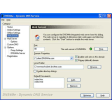
InternetTest is a small multi-tool that helps you check your internet connection status. The app is lightweight and comes with a modern interface, allowing easy navigation. Upon launching, it automatically tells you if you are connected to the internet or not. There is even an option to open your browser to check if your connection works. You can also see your connection history by clicking the small clock icon.
Users can also locate an IP address and website from the app. You only have to input the IP you want to find. You can even see it on a map via OpenStreetMap, Bing Maps, or Google Maps. Furthermore, the app comes with a Down Detector, allowing you to check if a website is down. Like the IP locator, you only have to provide the website you want to check.
As mentioned, the app is easy to use. It even allows you to customize its settings, including the test website, the HTTP protocol, and the default language. Moreover, it comes with a dark mode. However, unlike other network apps, you can only check your internet status. The app does not provide information on your upload and download speeds, latency, and packet loss. For this, you need to use other tools.
Should you download it?
Overall, InternetTest is a handy tool to have. Sure, the actions it can do can be performed manually, but the app groups them together. With this, you can easily access them without unnecessary navigation. The app is also easy to use and does not require huge storage space. However, it could use a few more helpful features, including providing network speed information. Nevertheless, it is a utility worth having.