FileZilla
FileZilla is a free, open-source FTP client that enables users to securely transfer files between their computer and remote servers using various protocols including FTP, SFTP, and FTPS.
Review
FileZilla: Professional File Transfer Made Simple
FileZilla stands as one of the most popular and reliable file transfer solutions available for Windows users. Whether you're a web developer, system administrator, or content manager, this powerful application streamlines the process of uploading, downloading, and managing files on remote servers.
What FileZilla Does
FileZilla is a free FTP client that connects your Windows computer to remote servers, allowing you to transfer files securely and efficiently. The application supports multiple protocols including traditional FTP, secure SFTP, and encrypted FTPS connections, ensuring your data remains protected during transmission.
Key Features
- Multiple Protocol Support - Handle FTP, SFTP, and FTPS connections with a single application
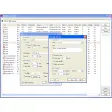
- User-Friendly Interface - Intuitive dual-pane design makes file management straightforward
- Site Manager - Store and organize multiple server connections for quick access
- Drag-and-Drop Functionality - Transfer files effortlessly between local and remote folders
- Advanced Features - Scheduled transfers, file synchronization, and batch operations
- Cross-Platform Compatibility - While available for Windows, FileZilla works across multiple operating systems
Ideal Use Cases
FileZilla serves numerous professional scenarios. Web developers use it to deploy websites and manage server files, system administrators rely on it for file maintenance and backups, and content creators leverage it to manage digital assets across distributed networks.
Who Should Use FileZilla
This application is perfect for anyone needing reliable file transfer capabilities, from beginners taking their first steps with remote servers to experienced professionals managing complex file systems. The open-source nature means it's completely free with no licensing costs.
Getting Started
Simply download and install FileZilla on Windows, then use the Site Manager to enter your server credentials. The familiar two-panel layout shows your local files on one side and remote server contents on the other, making transfers intuitive and efficient.